
Cheap Web Hosting: How to Choose the Best in 2026 (Without Getting Burned)
Looking for cheap hosting is, in 90% of cases, a frustrating experience.
Not because affordable hosting doesn’t exist — it does. The problem is that the market is full of offers designed to look like a bargain at sign-up and turn into a headache for the rest of the year.
Website down at 2am. Support that takes days to reply. A control panel that looks like it’s from 2009. Renewal prices that triple the first-year offer.
Sound familiar?
If you’re looking for budget hosting that actually works — that loads fast, stays online, and has a real person on the other end when something goes wrong — this guide is for you.
The real problem with “cheap hosting”
Most providers compete on price. And when the war is fought on price, something has to give. Usually what gives is what you can’t see: server quality, the size of the support team, infrastructure maintenance.
The outcome is predictable. You pay little in year one. By year two the site is slower, support is non-existent, and the renewal price is anything but cheap.
It’s not a price problem. It’s a criteria problem.
Because there are providers that offer genuinely reasonable prices without cutting corners where it matters. The trick is knowing what to look for before you sign up.
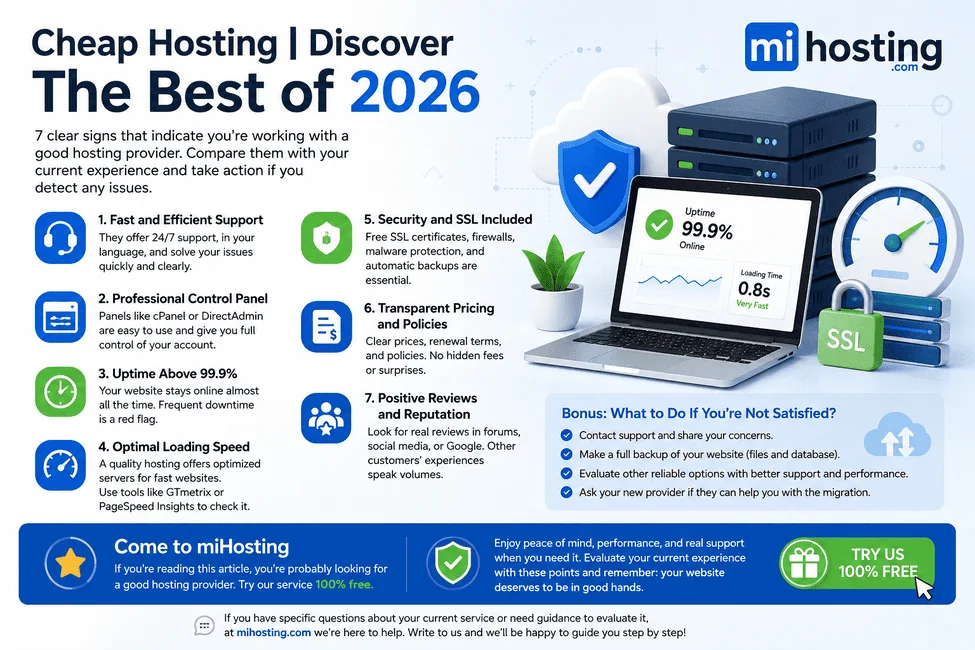
7 criteria for choosing cheap hosting without making a mistake
1. Real technical support, available 24/7
This is the most important one. No exceptions.
A hosting provider can have a bad day. Servers fail. WordPress breaks. Domains expire. When that happens, you need to talk to someone who knows how to fix it — not a chatbot, not a call centre that opens at 9am.
What to look for:
- Response in under 15 minutes, at any hour
- Specialist technicians, not generalist customer service agents
- Resolution in the same conversation, without being bounced between departments
The real test: Before signing up, contact support with a specific technical question. If it takes more than 20 minutes to reply, or the answer is generic, you already know everything you need to know about how they’ll treat you when something really breaks.
2. A professional control panel
The control panel is where you spend your time: creating email accounts, managing domains, installing WordPress, monitoring resource usage, setting up redirects. If the panel is confusing or limited, every simple task becomes a waste of time.
The two reference panels are cPanel and DirectAdmin. They’re the most widely used, best documented, and most compatible with the WordPress ecosystem.
Without leaving the panel, you should be able to:
- Create and manage email accounts
- Install WordPress (or any CMS) in one click
- Create and restore backups
- View CPU, memory and disk usage in real time
- Manage subdomains, redirects and SSL certificates
If any of those things require opening a support ticket, that hosting has a structural problem that no discount compensates for.
3. Guaranteed uptime of at least 99.9%
Uptime is the percentage of time your website is live and accessible. It sounds like a technical detail, but it has real consequences:
| Uptime | Maximum downtime per year |
|---|---|
| 99% | ~87 hours |
| 99.9% | ~8.7 hours |
| 99.99% | ~53 minutes |
Eight and a half hours of downtime a year might seem manageable. But if one of those hours lands on a product launch, your busiest traffic day, or the moment someone recommends you to a potential client — the cost is real.
How to check: Install UptimeRobot (free) before committing to a new provider. It alerts you by email every time your site goes down. If you receive several alerts in a month, you have an infrastructure problem — not a website problem.
Also check whether the provider publishes a public, accessible incident history. Those that don’t usually have something to hide.
4. Real speed: the server matters as much as the design
Google uses page speed as a ranking factor. Visitors wait a maximum of 3 seconds for a page to load. Beyond that, 53% leave.
The problem is that many website owners spend hours optimising images and plugins without realising the bottleneck is the server itself.
What determines server speed:
- SSD or NVMe drives: NVMe reads are up to 10x faster than HDD. If the provider doesn’t specify the drive type, it’s probably not NVMe.
- Up-to-date PHP version: PHP 8.x loads WordPress up to 40% faster than older versions. Ask your provider which version they offer.
- LiteSpeed or server-level caching: Dramatically reduces response time without needing extra plugins.
- Server location: A server in Madrid loads faster for Spanish users than one in Germany or the United States. Latency matters.
How to measure it: Open PageSpeed Insights with your current site. If you’re scoring below 60 on mobile and your site doesn’t have obvious issues with heavy images or plugins, the problem is the server, not your code.
5. Included security: SSL, backups and active protection
Security should not be an optional paid add-on. In 2026, it’s a basic obligation from any provider that takes its job seriously.
Free, automatic SSL
The HTTPS padlock has been mandatory for SEO and user trust since 2018. If your provider charges for an SSL certificate or doesn’t activate it automatically, that tells you a great deal about how they manage the rest of their infrastructure.
Automatic, off-site backups
Backups should happen daily, without you having to remember, and they must be stored on a server separate from the one hosting your site. A backup on the same server is worthless if that server has a serious failure.
Always ask: How often are backups taken? Can I restore from the panel without needing support? Are they stored on separate infrastructure?
Active protection against attacks
Your website receives unauthorised access attempts every day, even if you never notice. A good hosting provider blocks those threats at the server level: active firewalls, brute-force protection, malware scanning.
You don’t have to be a security expert. But your provider does.
6. Transparent pricing, no hidden surprises
One of the most common practices in the industry is the gap between the promotional price and the renewal price.
“First year at £0.99/month” sounds incredible — until year two arrives and the renewal is £9.99/month. That figure was in the contract, buried in the terms and conditions.
What to check before signing up:
- What is the exact renewal price, not the introductory offer?
- Is there a minimum contract period? What happens if you need to cancel early?
- Are storage, email and domain limits genuine, or do they have hidden conditions?
- Does the free domain included in year one have a cost at renewal? And does it require a specific billing cycle, such as annual payment, or is it also included with monthly billing?
An honest provider explains all of this from the very first page. They don’t hide it.
7. Real, verifiable reputation
There is no better indicator of a provider than the experience of its current customers. But you need to know how to read reviews.
Where to look:
- The provider’s Google Business Profile
- Specialist forums (WebHostingTalk, Reddit r/webhosting)
- Trustpilot
What counts and what doesn’t:
Generic reviews like “great service, highly recommended” tell you nothing. What matters is whether comments mention specific situations: how a problem was resolved, how long support took, how a migration went.
The provider’s responses to criticism also reveal a lot. A company that responds personally, acknowledges mistakes, and explains how they were fixed is a company that has real people behind it.
A company with 20 negative reviews all mentioning the same problem — unresponsive support, frequent outages, unexpected charges — is telling you everything you need to know.
What happens if you choose wrong?
It’s not immediately catastrophic. The problem with bad hosting is that it accumulates slowly.
At first, the site loads a little slower. Then there are occasional outages. Then support takes longer to reply. Then you discover the backups aren’t as automatic as promised. Then Google starts penalising your rankings because your load time has crept too high.
By then you’ve spent months with a provider that isn’t delivering, and migrating becomes a task you’ll “get to when you have time” — which never comes.
The decision that seems minor at the start turns out to be one of the most important ones for your online presence.
Quick checklist before signing up
- I’ve checked the renewal price (not just the introductory offer)
- I contacted support and they replied in under 20 minutes
- The provider specifies SSD or NVMe drives
- Guaranteed uptime is 99.9% or higher
- Free, automatic SSL included
- Daily automatic backups stored on an external server
- I can manage everything from the panel without opening tickets
- Real customer reviews are positive and specific
If you tick fewer than 6, keep looking.
One last thing
Cheap hosting doesn’t have to mean bad hosting.
There are providers that offer reasonable prices without sacrificing speed, support or security. The difference is knowing what to look for — and not being drawn in by the first price that appears on Google.
If you have doubts about your current provider, or want someone to assess your situation before you decide, we do exactly that at miHosting — no strings attached. No bots. No endless forms. A real technician who responds in under 15 minutes.
Talk to a technician — we’ll evaluate your situation and tell you honestly whether switching makes sense, and to what.
From an idea to your first website.
Try free hosting for 6 months. When you need more resources and support, compare our professional plans. Your domain is purchased separately.